The Visual Online Form Builder for Every Team
A no-code form builder that works visually — click to select from 18 input types, apply 8 design settings, and accept file uploads of any size. Organize in projects and folders, go live in minutes.
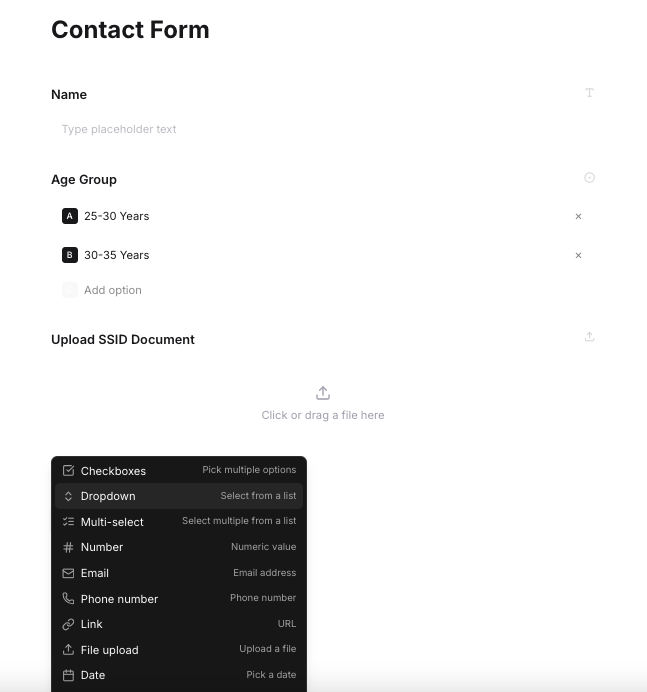
How the Visual Form Builder Works — Three Steps
PaceForms is a no-code form builder — click, configure, and publish. No developer, no server, no setup.
Create a Project and Folder
Set up a project for each client or campaign. Add folders to group related forms. Every form has a home — nothing gets lost.
Select Fields — 18 Input Types, 8 Design Settings
Click to select any field type from the dropdown and add it to your form. Apply a design setting to make it beautiful. File uploads, polls, linear scales — all in one place.
Preview, Customize, and Go Live
See your form live before anyone else does. Tweak colors and branding, then copy your unique link — ready to embed or distribute instantly.
My Workspace
Organization
Keep Every Form in Its Place
As your online form builder scales, staying organized matters. PaceForms uses a three-level hierarchy — Projects, Folders, and Forms — so every form has a home. One project per client or campaign, folders to group related forms, no lost links.
- Projects — Top-level containers — one per client, product, or campaign
- Folders — Group related forms within a project — surveys, onboarding, feedback
- Forms — Individual forms with their own URL, settings, and submissions inbox
Visual Form Builder
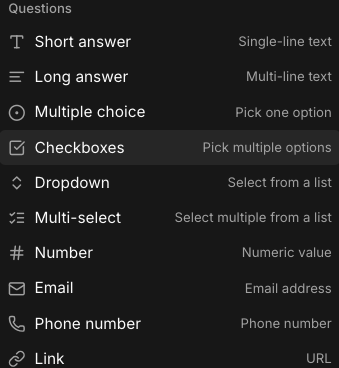
18 Input Types — Click, Select, and Build
Every field type you need is one click away. Select from the dropdown, add it to your form, configure it, and move on. No code, no guesswork.
Multiple Choice
Pick one option from a predefined list
File Upload
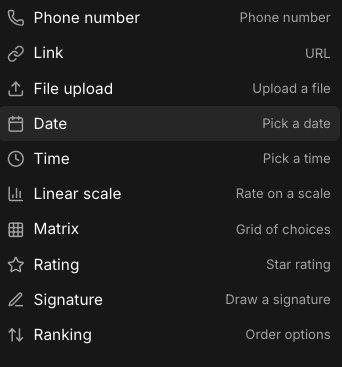
Upload any file — any size, any type
Linear Scale
Rate on a numeric scale — great for NPS
Short Answer
Single-line text for names, IDs, quick answers
View all 18 input types
Long Answer
Multi-line text for detailed feedback or descriptions
Checkboxes
Pick multiple options at once
Dropdown
Select one item from a scrollable list
Multi-select
Select multiple items from a list
Number
Accepts numeric values only
Validated email address field
Phone Number
Formatted phone number input
Link
URL input field
File Upload
Upload files with no size or format restrictions
Date
Pick a date from a calendar
Time
Pick a time value
Linear Scale
Rate on a numeric scale — great for NPS and satisfaction
Matrix
Grid of choices — rows and columns
Rating
Star rating input
Signature
Draw or type a signature
Ranking
Drag to order options by preference
The Online Form Builder with File Uploads of Any Size
Most online form builders cap file uploads at 10 MB and block common formats. PaceForms has no such limits — your respondents can upload PDFs, videos, PSD files, ZIP archives, spreadsheets, or anything else you need to collect.
- No size cap — PDFs, videos, ZIPs, PSDs all go through
- Every file format accepted without restriction
- Files saved securely to your submissions inbox
- Preview uploaded files directly in the dashboard
- Download individually or export in bulk at any time
File Upload Field
Any size · Any typeDrop any file here
PDF, ZIP, MP4, PSD, XLSX — all accepted
design-mockup.psd
48.2 MB
project-brief.pdf
2.1 MB
demo-video.mp4
320 MB
Design Settings
8 Design Settings to Make Your Form Beautiful
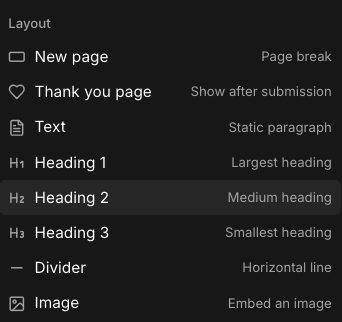
Go beyond questions. Add headings, dividers, images, a thank you page, and page breaks to turn a plain form into a polished, branded experience.
New Page
Add a page break to split your form into steps
Thank You Page
Custom message shown after submission
Text
Add a static paragraph for instructions or context
Heading 1
Largest heading — great for section titles
Heading 2
Medium heading for sub-sections
Heading 3
Smallest heading for fine-grained structure
Divider
A horizontal line to separate sections visually
Image
Embed an image anywhere in your form
Before You Go Live
See It. Brand It. Share It.
Preview your form exactly as respondents will see it, customize every visual detail, then share a unique URL — all before a single submission comes in.
Live Preview
See your form in real time as you build. What you see is exactly what your respondents see — no surprises after you hit share.
Custom Branding
Add your logo, set brand colors, choose a font, and write your own confirmation message. Make the form feel unmistakably yours.
Share a URL
Every form gets a unique, shareable URL. Copy it, send it, or embed it on any page — your form is live the moment you click share.
Submission Management
Build the Form. Control What Comes Back.
All responses are yours to manage. View incoming data, filter spam, fire webhooks to your tools, and notify the right people — all from one dashboard.
Submissions Inbox
Each new response lands in a searchable, filterable inbox. See entries as they come in, mark them read, and export to CSV at any time.
- ✓ All responses in one searchable place
- ✓ Filter by field value or date
- ✓ One-click CSV export
Spam Detection
PaceForms automatically flags suspicious submissions using honeypot fields and pattern detection. Review flagged entries and keep your inbox clean.
- ✓ Automatic honeypot fields on every form
- ✓ Flag and review suspicious submissions
- ✓ Manual spam marking and bulk delete
Webhooks
Fire submission data to any URL the moment a form is submitted. Connect PaceForms to Slack, your CRM, Zapier, or any custom endpoint in real time.
- ✓ Real-time POST on each new entry
- ✓ Send to Slack, CRM, Zapier, or any URL
- ✓ Full JSON payload with all field values
Recipients
Add one or more email recipients who get notified the moment a form is filled. Different forms, different recipient lists — full control over who sees what.
- ✓ Multiple recipients per form
- ✓ Custom email notification template
- ✓ Instant delivery on each new response
Frequently Asked Questions
Everything you need to know about the PaceForms form builder.
What is an online form builder?
An online form builder is a web-based tool that lets you create, design, and publish forms without writing any code. PaceForms is a visual online form builder — you click to select from 18 input types, apply design settings, and share a unique URL. Every response is saved automatically to your submissions inbox.
What is a no-code form builder?
A no-code form builder lets you create and publish forms without writing any code. Instead of building input fields in HTML or JavaScript, you select field types from a visual interface, configure them by clicking, and publish with a shareable URL. PaceForms is a no-code online form builder — no developer or backend required.
What field types does PaceForms support?
PaceForms supports 18 input types including multiple choice, linear scale, poll, short text, long text, and file upload — all selectable from a single dropdown when building your form.
Is there a file size limit for uploads?
No. PaceForms accepts file uploads of any size — there are no artificial caps. Most form builders limit uploads to 10MB; PaceForms has no such restriction.
What file types can respondents upload?
Any file type is accepted — PDFs, images, videos, ZIP archives, PSD files, spreadsheets, and more. You set the field and your respondents upload whatever they need.
How do I organize multiple forms?
PaceForms uses a three-level hierarchy: create a Project (e.g. by client or campaign), add Folders inside each project to group related forms, then create Forms inside folders. No more lost links or cluttered dashboards.
Can I preview my form before sharing it?
Yes. PaceForms includes a live preview so you can see exactly how your form looks and behaves before it goes live. Customize colors, branding, and design settings, then publish with one click.
How do I get notified when someone submits a form?
Add one or more recipients who receive an email notification each time a form is filled. You can also set up webhooks to push response data to any URL in real time — useful for Slack alerts, CRMs, or custom automations.
How does spam detection work?
PaceForms automatically flags suspicious submissions using honeypot fields and pattern detection. You can review flagged entries in your submissions inbox and mark them as spam manually.
Do I need to know how to code?
Not at all. PaceForms is a visual online form builder — everything is point-and-click. Select field types from a dropdown, add them to your form, choose a design setting, and go live instantly. No developer needed.
Start building your first form today
18 input types, 8 design settings, and unlimited file uploads. Free forever on the starter plan — upgrade when you need more.